The earliest digital audio mixers of the 1980s were very big, very expensive, and truly cutting-edge. One might debate whether the A/D and D/A conversion and internal processing were yet “good enough” for top-tier music recording, but the capabilities they introduced are now commonplace and often indispensable.
Fortunately, the tech has steadily improved, with size and cost coming down to the point where surprisingly good small digital mixers are practically commodities. And the tech is mature enough that many operational concepts are well-established and found across many products.
A digital mixer is basically a math machine. It’s still possible to make digital mixers with discrete components, but let’s assume at this point that, in fact, the “mixer” is a virtual device running in software. Audio, in the form of digital bits, is pushed around numerically to accomplish all the usual analog mixer tasks, plus many more.
Of course, this is also true for the DSP (Digital Signal Processing) used in many AV systems. The difference here is the addition of hardware controls and menus designed specifically for real-time operation by humans. Since the mixer is virtualized, several key differences with analog emerge: Internal signals need not follow fixed paths, physical controls can be shared, and settings can be stored.
Signal Architecture
Because signals no longer move through circuit board traces and discrete components, it’s not necessary to follow the traditional pattern of inputs flowing down the channel to a bus, and then out. Nor do traditional “aux sends” make much sense. In my experience with several small and medium digital mixers, input channels can feed many mixes (formerly buses) that are essentially identical.
It’s still typical to have a “Main Mix” to establish the primary output path, especially for live sound work. But there might be four, ten, thirty, or more other possible mixes that have the same capabilities and routing options. The number of mixes is mainly limited by computing power, physical size for connectors, and product differentiation.
In addition to some analog connections, even small mixers may have “digital snake” ports for signals to/from one or more analog stage boxes, usually on CAT6 cable. The analog conversion is done at the stage box, and different mixers use different (incompatible) transport methods. The mixer may have network connections for Dante, AVB, or other IP protocols, USB connections for computer interfacing, and option slots for other kinds of interfaces. Once inside the virtual environment, all of these I/O signals are essentially equal.
It’s usually possible to virtually “patch” (route) physical input and output connectors, as well as digital input and output signals, to various places in the signal path. For example, analog mic input 1 on the back panel can be patched to processing channel 8. Or Dante output 5 can be fed from Mix 2.
So it’s not unusual for a physically small mixer package to boast 40+ channels of I/O and 32 mixes. I/O often comes in groups or multiples of eight, which harkens back to the world of digital circuitry and computing, but it’s all just data and math. As with any electronic tool, the art comes from how they’re used, and the incredible flexibility of digital mixer architecture can enhance the possibilities.
It can also be rather confusing. Understanding the routing options and terminology for a given mixer can take some effort, and moving between mixers from different manufacturers is challenging. Most of the underlying principles are similar, but the user interfaces can be very different.
Additionally, trying to think in terms of how analog mixers work is sometimes less than helpful because it just doesn’t apply in many places. The terminology may sound the same, but the actual functions may not be.
Fortunately, it’s usually still possible to find a block diagram that describes at least some of the mixer topology. But a lot of operational information will be found in descriptions of menus and function buttons that are unique to a particular design.
Control Delegation & Menus
 The user interface and control surface of digital mixers (especially compact ones) can be quite different from analog. Since the mixer is virtual, without physical signal paths, controls are arranged for different operational strategies.
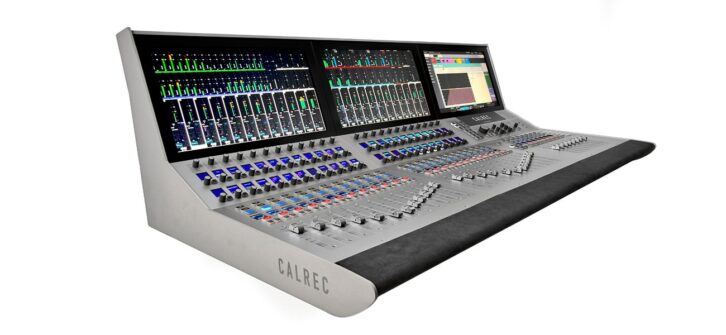
Referring to the illustration, the most obvious example of this is for input channel functions like mic gain and EQ. Rather than duplicate controls on each channel strip, there is one group of controls used by all channels. Pressing the delegation (assign) button on a channel temporarily gives the group of controls to that channel. All the indicators will change to reflect how that channel is set, and are remembered when another channel takes over the control group. This may also apply to other channel-oriented controls, like routing to mixes or controlling effects.
This arrangement is a huge space and cost saver, but comes with a few negatives. First, the user must develop the habit of hitting the assign button before making changes, otherwise the changes might affect the wrong channel! Second, the lack of immediate access to every control can be problematic in a fast-moving live situation. Third, it’s not possible to glance at the surface and compare settings, or grab the same controls, on multiple channels at once. On the plus side, however, control settings can be easily copied between channels.
Similarly, faders can do multiple duties. One typical arrangement uses “layers” to delegate faders for different functions. For example, if Layer 1 is active, the faders control levels for the first 8 channels. Switching to Layer 2 assigns those faders to channels 9-16. Layer 3 might be channels 17-24. On some mixers, a fourth layer might assign the faders to be bus (mix) masters. Once again, it’s critical to know what Layer is currently active before moving a fader!
And again, not having instant access to every channel fader could be problematic in certain situations. Some mixers improve this by allowing physical faders to be assigned to different channels. If there are 32 active channels, but only 16 faders, it might be possible to assign the most critical channels to faders on Layer 1, even if they are not physically sequential.
Many small mixers have a “sends on faders” mode that allows channel faders to be used as sends for creating mixes. Let’s say Mix 4 is going to feed a reverb effect. In order to create that mix, which will have various amounts of audio from different input channels, you press a button for Mix 4, and now each fader determines how much signal from its channel goes into Mix 4 (like a “send” knob in analog). While this function is invoked, the faders do not affect the levels in the Main or any other mix.
In most digital mixers, an on-board display presents menus for all manner of functions, often with multiple tabs. Menus may be used to do patching or routing, assign channel names and labels, adjust effects, activate test signals, etc. In some designs, when an EQ or compression control is turned, the display will automatically switch to a detail view of the EQ or compression settings, often including a graph of the curve.
One of my favorite display functions is metering. In some mixers, the meter screens show levels of inputs, outputs, effect sends and returns, and other signals. This is incredibly useful when setting up or troubleshooting a system. In fact, it surprises me that there are still digital mixers around without comprehensive metering—it’s just software!
I should note that the concepts above apply across digital mixers in general, but mixers built for specific environments, such as broadcast audio production or live radio, can be significantly more unique and varied in the way they operate. Large mixers with extensive I/O and functionality may separate the control surface from the processing engine.
On the smaller end, some manufacturers have turned the menu display into a touchscreen and have given up most physical controls altogether. This saves cost and construction complexity but can make “getting around” even trickier.
Memories and Effects
Given the virtual nature of a digital mixer, being able to store and recall settings is a major benefit. In most cases, it’s possible to save snapshots of the entire board or of specific sub-systems (like on-board effects). There may be extensive menus for storage libraries and selecting which parameters are recalled under certain conditions.
Being able to reconfigure the mixer for different shows or tasks, or carry favorite settings between mixers, is incredibly powerful. Just being able to recall a clean “starting” condition at any time can be a lifesaver if someone has mucked around in the settings. Managing (and backing up) mixer memories should be a standard operating procedure.
Even the most compact digital mixer is likely to include a collection of on-board effects that can be assigned to various signal paths. It’s not unusual for every input channel to have parametric and graphic EQ, compression, gating, and delay. The same may be true for mix outputs.
Assignable effects might include echo and reverb, pitch shifting, chorus, etc. Just about any effect processor found in hardware or software could be included, depending on the manufacturer and intended user. As with mixes, the practical limitation on quantity of effects is processing power. Larger mixers with lots of power may even run effects plug-ins normally found on DAWs.
Working with digital mixers in video production environments, I have found that having delay available on inputs and outputs is especially useful because there are many situations where audio and video can fall out of sync. Almost always, the video is behind, so delaying the audio in a particular path can put things right. Delay is also useful for sound reinforcement in large venues with distant speaker clusters.
Downsides
Digital mixers bring so much functionality and flexibility to any situation that it’s pretty hard to find negatives. But there are a few things to keep in mind. We’ve already mentioned the complexities and hazards of using delegated controls, which include having to remember settings that are often hidden from view. The schemes used by particular mixer models for quickly “interrogating” the status of functions might be important in some situations.
Mixing and processing in the digital domain— doing the math—can vary in quality, but these days the differences between mixers are likely to be small (and hard to quantify) unless you’re working at the very high end. The quality of analog circuitry, and the A/D and D/A converters to get signals in and out, may make a bigger difference in sound quality. Mic preamps, for example, can vary quite a bit in characteristics like noise and available gain.
The reality is that analog circuit design is a science and art that’s radically different from building algorithms to process audio in software. Some manufacturers put a great deal of effort into their analog designs; others may not. In many situations, it won’t matter, but analog performance could be something to keep in mind when evaluating digital mixers.
Another area of technical complexity is sample rates and syncing. As a digital audio device, all internal functions are locked to a common clock. Typical default settings for the internal clock are likely to be 48Khz or 44.1Khz. Some mixers can operate at 96Khz or higher, but that may steal some processing power from other mixer functions, such as reducing the number of mixes.
If the mixer is used in a standalone situation, with just analog I/O or its own stage boxes, syncing is not an issue–though a valid internal clock must be selected or the mixer will produce no sound. Interfacing with AES, Dante, AVB, or other digital signals does require some attention to sync sources and matching rates. This might be done with AES wordclock, Precision Time Protocol, video reference, or designating a particular digital input as the clock master for the mixer. The mixer should indicate when it is locked to a valid internal or external clock source.
Finally, it’s worth mentioning the issue of failure modes. If some parts of an analog mixer fail, it’s likely that some will still work (unless the power supply dies). With digital, if the processing stops working, everything stops. Unless the board has redundant components or a failover mode, there is no “partial” way to keep going.
So, although digital mixers are becoming common everywhere, analog is still valid and worth considering in the right situation. This is especially true if the need is small, simple, or mission critical.