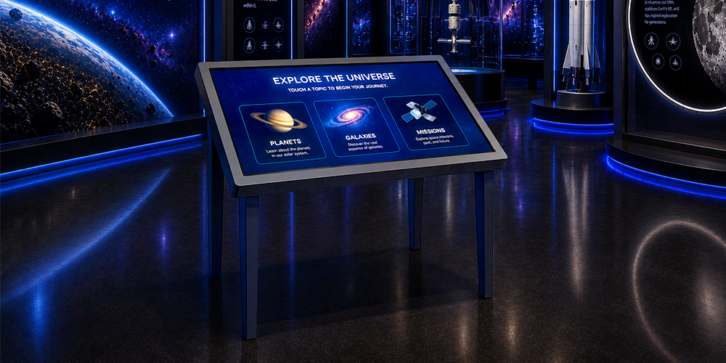
Walk into almost any museum, visitor center, or amusement park these days and you’ll find a wall-mounted touch screen somewhere, usually bolted upright like a vending machine. According to Sean at GPO Display, that orientation is often the wrong call, and not just for design reasons.
“Most touch screens are not suited to use in an upward-facing orientation,” Sean explains. “Almost all touch screens’ warranty will be voided if they are placed in a table application.” The issue comes down to hardware: ventilation problems and panel bending or bowing can cause delamination and LCD failure when a screen designed to hang vertically is instead laid flat. That gap between what venues want (a tabletop experience) and what standard displays can survive is exactly the problem GPO’s InteracTable line was built to solve.
More Than One Set of Hands
The appeal isn’t purely mechanical. A horizontal touch surface changes how people gather around it. Sean points to three advantages over an upright kiosk. First, tables let several people interact at once instead of forming a line in front of a single screen. Second, they mimic something museums have done for decades: laying out maps, blueprints, and schematics for visitors to lean over and study together, just now in digital form. Third, there’s the matter of comfort. “Feel your shoulder after just a minute or two of continuous interaction with an upright touch screen,” Sean says. “You’re likely feeling the burn already.” A table lets people rest their arms and stay engaged longer.
Multi-user support isn’t just a talking point either. GPO’s default is 10-point projected capacitive touch, but the company can scale up to 32 simultaneous touch points on a single display when a client needs a whole group interacting at once, whether that’s for gallery overviews, artifact deep-dives, or wayfinding.
Customization starts with matching a standard format (Lobby, Pedestal, Flow-Thru) to the venue’s needs, then dialing in screen height and angle depending on whether users will be standing or seated. From there, GPO adjusts housing, from custom colors and logos to cabinet space for PCs and other hardware.
The Budget Mistake Nobody Sees Coming
Sean is candid about where venues get the budgeting wrong. Hardware tends to get the attention and the line-item, but content is where plans quietly fall apart. “Content creation and updating is often overlooked,” he says, “even in cases where content is produced in-house.” Fresh content is what keeps repeat visitors engaged, and it needs its own dedicated time and resources, not leftover budget.
Reliability gets the same treatment. Venues fixate on display uptime, but Sean argues the media players and content delivery systems behind the glass deserve just as much scrutiny, including a real plan for network outages or PC failures.
Where This Is Headed
Looking ahead, Sean expects AI to move from content generation into camera-based triggers, tailoring what’s shown based on a visitor’s age or how many people are standing at the table, and helping people navigate directories or menus more intuitively.
His advice to facilities managers shopping for interactive tech boils down to one question they rarely ask up front: “How will I update and maintain the interactive content two or three years from now when exhibits, tenants, etc. have changed?” It’s a fair challenge. The screen is the easy part. Keeping it worth touching is the real job.