Header photo: Store Norsk Leksikon
A client of mine was complaining about hum in their audio mixer. This was a system that I had built and knew well. I also had used the same model mixer in several other systems and never had a problem. The story was that when they brought up the mic level on several inputs, there was a very quiet, but noticeable, hum.
This particular system was set up as a radio/podcast studio, using four Electrovoice RE20 mics. The RE20 is a large-diaphragm dynamic mic typically used on high-level sources, like drums, and often used by radio DJs of the past. Yes, they are everywhere now in podcast studios, though generally not what I would recommend. The mic output is pretty low with speaking voices, so they would crank up the gain to get the level they wanted in audio software on a connected computer.
My first thought was that someone had draped the mic cables over an AC power cord or something. It seemed incredibly unlikely that the mixer was the culprit, but they had already decided to buy a new one. Unfortunately, when I installed the new mixer, the same problem occurred!
After swapping around mics and cables, I discovered that the hum was worst on channel 1, got steadily lower, and was gone by channel 4. Of course, channel 1 was the main host mic, so always in use. I decided to take the original mixer home and find out what was going on.
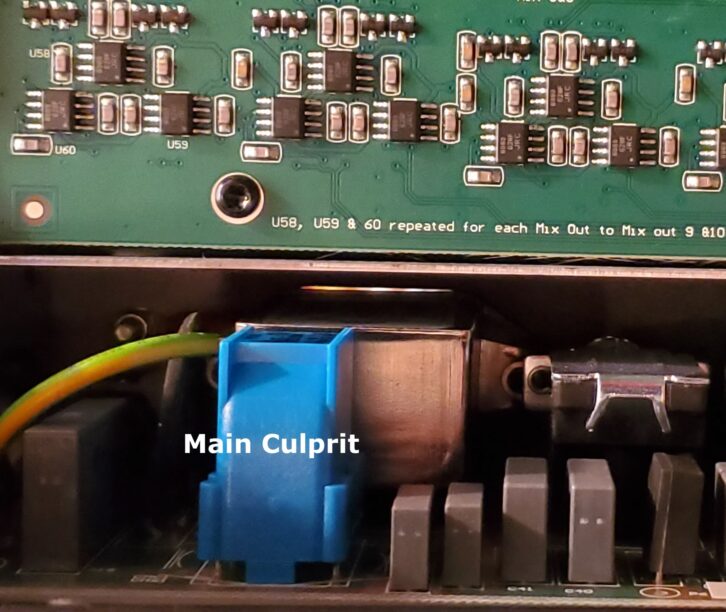
When I got the mixer open, I discovered that there is a power supply circuit board directly underneath the first few mic input jacks. So I got out my magnetic shielding kit and played around with inserting a piece of mu-metal between parts of the power supply and the mic jacks. Sure enough, when I covered a particular part (likely a filter coil), the problem went away.
It’s pretty easy to see in Figure 1 that the part in question is nearest to the first few mic inputs, which correlates with the hum dropping off as the channels go up. Figures 2 and 3 show a close-up of the power supply board, with and without the mu-metal shield added. I was able to secure it with a screw through one of the mixer feet holes which happened to be in just the right place.
Presumably, this design flaw was present in many mixers of this model. I was surprised it had gotten past the manufacturer’s testing but not surprised that I had never noticed it before, because my other installations were using line-level sources or mics with more output level. The hum was only noticeable in a particular set of circumstances.
The Physics

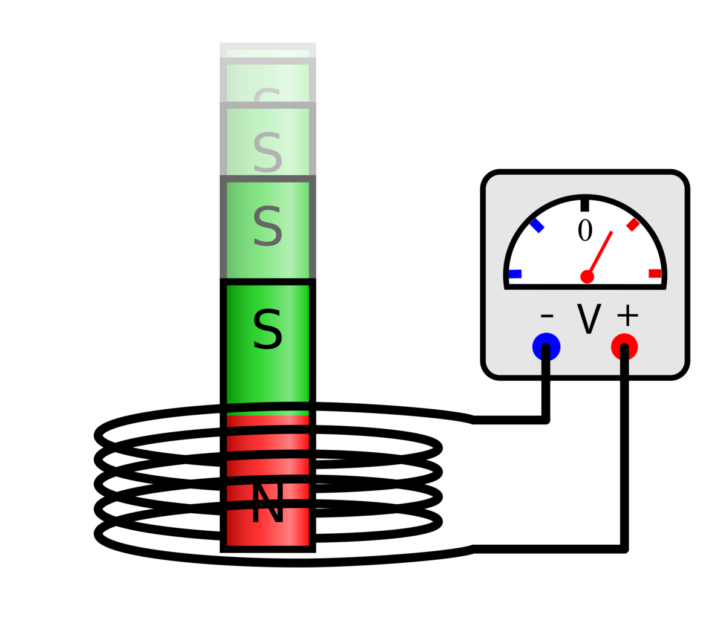
Basic Electricity 101 says that a current passing through a conductor creates a magnetic field around the conductor. Conversely, when a magnetic field cuts across a conductor, a current is induced in the conductor. And that is the story here: The current in the presumed filter coil created a magnetic field that induced a noise signal in the mic preamp circuits nearby.
Judging from the circuit board layout, I guessed that the coil was part of the AC side of the power supply, which corresponds to the induced signal being at 60Hz (AC line frequency in the U.S.). I would generally call that low-frequency hum (as opposed to buzz or static).
The magnetic field strength (flux) changes as the square of distance, so it’s no surprise that by input 4 the hum was undetectable. In theory, there might also be hum induced in other nearby circuits, such as the mix outputs, but the normal signal levels would be high enough that a tiny hum would never be heard. In fact, in order for me to hear the hum while testing, I needed to have the preamp gain, channel level, and headphone volume all the way up.
Getting into the topic of shielding, in general, ferrous metals (those containing iron) have magnetic properties, while non-ferrous metals don’t. So steel, which is made from iron, can be attracted to a magnet, while aluminum cannot. A notable exception is the family of “stainless steel” alloys, which are often much less magnetic than plain steel due to their makeup. Other metals, such as nickel, also have magnetic properties.
Magnetic fields cannot be absorbed or blocked, so magnetic shielding in industrial and scientific applications, as well as inside various types of AV equipment, is about directing the magnetic flux away from the parts you want to shield. Metals with greater permeability attract the magnetic field into themselves and around the shielded component.
While steel offers some magnetic shielding, so-called “mu-metals” (mu being the Greek letter used to symbolize permeability) are alloys specifically formulated to attract and redirect magnetic fields. MuMETAL is actually a trademark and product of the Magnetic Shield Corporation. More information on this topic is available on their website: https://www.magnetic-shield.com/mumetal-technical-data/
So in the case of the mixer, the little piece of shielding material redirects the magnetic field to prevent it from reaching the mic pre circuits. I chose the size and location by moving pieces around while listening to the hum. Having some mu-metal on hand can be useful for diagnosing or eliminating possible induced noise, which is why I bought a lab kit from MSC long ago. It also includes a simple magnetometer for measuring fields.
It’s important to note that the electromagnetic field associated with the movement of electric charge (let’s say signals in a wire) has two components. The magnetic field around the conductors causes the inductive effects discussed here. The corresponding electric field is responsible for all the RF (radio frequency) transmission and reception we know and love. For more see: https://www.svconline.com/industry/mysteries-of-rf
What we tend to call “electromagnetic interference” (EMI) or “radio frequency interference” (RFI) is caused by unwanted electric fields being picked up when conductors act essentially as antennas. Braided or foil shields in cable, which are typically copper or aluminum, are intended to reduce EMI, but won’t help with magnetically induced noise because they are not magnetically permeable.
While both electric and magnetic fields can have theoretically infinite range, in general magnetic induction operates over small distances, such as between cables run next to each other, or between the windings of a transformer.
Other Practical Considerations
It’s common practice in AV systems to keep signal cables away from power cables or have them cross at a 90-degree angle, which is about reducing magnetic induction. Steel conduit also helps contain the magnetic field of AC power conductors run near AV equipment.
I try to follow these guidelines, though I have found that induced noise from AC power within racks or cableways is not much of a problem in practice. I believe there are several reasons for this. One is the inverse-square rule, which means that the field falls off quickly with distance. The second is because AC power conductors generally run together in pairs of opposite polarity (hot and neutral), which causes the magnetic fields around them to cancel out. Within power cords, the conductors are often twisted together as well, which improves cancellation.
Third is the use of balanced audio connections. These days, analog audio is the most obvious place to notice induced hum (or other noise), and balanced interfaces will reduce or eliminate these problems by canceling induced noise at the input. For more on that see: https://www. svconline.com/needtoknow/analog-audio-interfacing
It’s also possible for induction to happen between, say, speaker cables carrying high current and adjacent microphone cables. Or between speaker and line level, or line and line. But mic-level signals, which must be greatly amplified, are the most likely to be affected. And, again, balanced connections mitigate this issue. So even my initial reaction to the mixer hum problem—that the mic cables were near some AC power—was probably unlikely.
Interestingly, as network data rates have increased, the ability to make better network cable relies greatly on controlling inductive effects. High-bandwidth cable specs use terms such as Near-End or Far-End Crosstalk (signals induced between pairs in the same cable) and Alien Crosstalk (induced signals from external sources like other cables) to characterize inductive coupling specs.
Like any interface that uses balanced pairs, crosstalk is affected by how the pairs are twisted, how they are placed within the cable, and how the cable is handled. Fortunately, the balanced drivers and receivers of Ethernet connections are transformers, specified by standards, so performance is likely to be consistent, as opposed to audio applications, where circuit designs vary considerably. Speaking of transformers, these entirely inductive devices are incredibly useful in AV applications as described here: https://www.svconline.com/ industry/transformers-the-hidden-gem
Back to AV, most speakers and several types of microphones use induction. When CRT televisions were still the main way to watch video, many pro speakers included internal magnetic shielding because CRTs could be affected by the strong fields of speaker magnets.

Magnetic induction is the most common method used to convert electrical energy into motion, or vice versa, as seen in motors and generators. And by now, it should not be surprising that induction is key to wireless power, as in cell phone chargers. In “proximity” technology for security cards and fobs, credit cards, and NFC tags, induction delivers energy over short distances to power the card’s chip and also moves the data between cards and readers.
As for my client with the mixer hum, they had a few options. They didn’t want to put back the mixer I had fixed. So my suggestion was to use a condenser mic (or mics), which would provide higher output thus needing less preamp gain. Another option was to keep the RE20s and shift the mics over a few channels where there was no hum. Ultimately, they bought some CloudLifters, which go inline with the mic and add about 20dB of gain before the mixer preamp.