Coming from the broadcast/production world, where equipment is expected to meet certain quality standards, I am pretty skeptical about all that “odd brand” equipment turning up online. Everyone knows what I mean; companies with cute or bizarre names, often selling sophisticated-sounding products at crazy low prices. When they don’t work well, I’m not surprised.
Now I should point out that sometimes what sounds like an “off” brand is, in fact, a highly respected professional manufacturer that is simply not well-known in the US. For example, Wisycom wireless audio products. But that’s on us to research and figure out.
Lilliput, on the other hand, still raises my concern, especially when some of their offerings really seem too good to be true. Nevertheless, I needed to test some equipment removed from a facility and realized that I currently have no “bench” monitor for HD or 4K video. I have some test equipment that accepts those formats, but not with useful displays.
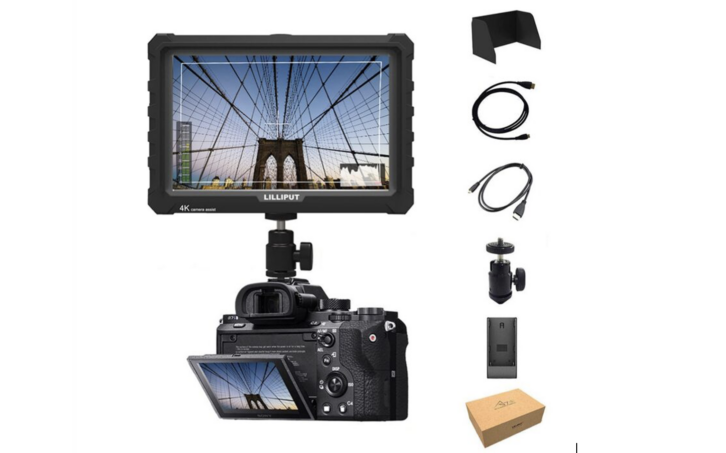
So I did some poking around and decided to stick my toe in the water with a Lilliput A7S monitor. They currently run around $200 new, got one for about $60 on eBay. This is a 7” field monitor, typically mounted on-camera using standard 1/4-20 screw holes. For my purposes, just confirming video function and maybe reading the resolution and frame rate, it’s fine, and is also handy to take on a job.
Over a few days testing various devices, I’ve found the A7S to be better than I expected! Most importantly, it will accept and display a wide range of input formats, from 480i standard-def up to true 4K (4096×2160). That includes all the “computer” formats I could throw at it, like 1024×768 (XGA) and 1600×900. In fact, feeding directly from a Mac laptop, the A7S was happier with some of the oddball formats than my Cardinal HDMI analyzer. Or perhaps it’s more “forgiving” of spec deviations. With HDMI, one never knows.
The display itself is native 1920×1200, so can show pixel-to-pixel up to that format (WUXGA). There are settings for pixel-pixel, hold aspect ratio, or zoom, which work as expected up to full HD. UHD and 4K signals are scaled to fit, but don’t follow the pixel-pixel or hold aspect settings, which can result in aspect ratio distortion. The A7S was not able to show under-sampled UHD, such as YUV 4:2:0, but that is unlikely to be a problem very often.
As with many monitors, when the input is connected or changed the resolution and frame rate show on the screen for a few seconds, which is always handy. While the monitor has no trouble displaying both integer and fractional frame rates, the OSD readout does not differentiate (ie, both 30 and 29.97 are called “30”). Less helpful than it could be, ah well.
For my purposes, it would have been nice to have SDI inputs, but I did not want to take a chance on the more expensive FS7 model. The A7S has HDMI In and an active loop-through (which works as long as power is present, even if the screen is off). The EDID reports that 1920x1080p60 is the “preferred” resolution, up to 12-bit color. It does not support HDCP, which is typical for a production monitor but might be a problem in some situations.
Menus are accessed and controlled with a combo rotate/ push dial on the upper corner of the case, plus a few buttons along the top. Menu operation is similar to many devices; rotate to select options, push to activate, exit to back out. There are two user-assignable buttons. Menus are available for the usual monitor settings, like brightness and contrast, as well as three color-temp options. Because this is intended as a camera monitor, it includes an assortment of optional on-screen markers for keeping shots within spec, as well as emphasis indicators for picture conditions such as sharpness, exposure, etc. Some markers are not usable in pixel-pixel mode. There is a histogram display, but no waveform or vectorscope.
For audio, two-channel on-screen audio meters can be turned on, there are rear-firing speakers, and a mini-plug headphone jack. Volume can be controlled from the menus or by clicking through options with the dial (after first starting with Brightness). I chose to put the audio meter on/off function on a user button to easily clear them off the screen.
On this older A7S the case is mostly plastic, so light but not very robust. New models are stated as metal. It comes with a rubber surround, which adds some resiliency and improves handling. A new unit includes a few other accessories for field use, like a sun visor. Power is from an included AC adapter, or a battery can be mounted on the back.
Bottom line, the A7S is quite functional as an on-camera monitor and is surprisingly versatile for the price. As test equipment, it lacks some important features, but for just checking signal presence, it’s good enough and will be worth having around. How long it will last (especially the turn/click menu button) is TBD.